
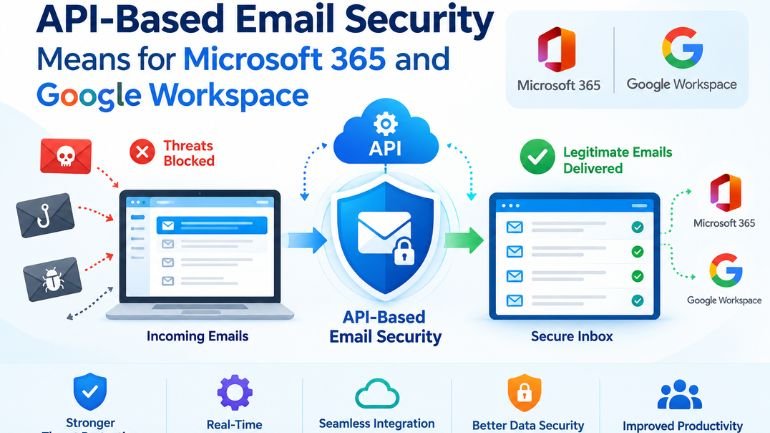
An email security product can connect to Microsoft 365 or Google Workspace in minutes and still require careful operational planning. The connection method answers how the product reaches messages. It does not, by itself, explain which attacks it detects, when it can act, or what happens when a legitimate email is removed.
For an IT team evaluating API-based email security, the useful question is what the connection enables throughout a message’s life. Can analysts inspect an email, understand a verdict, find related messages and reverse an incorrect action? A clear answer to those questions is more valuable than a short installation demonstration.
Understand where inspection happens
An API integration gives an authorized application a way to interact with a cloud email service. Depending on its design and permissions, the product may inspect messages, retrieve relevant information and perform supported mailbox actions. Deployment often leaves the organization’s existing mail routing in place. Buyers should confirm that architecture for the specific product rather than infer it from the API label.
Ask the vendor to draw the sequence from receipt to detection to remediation. Does a message reach the inbox before inspection finishes? What is the expected delay under normal and heavy traffic? Which native email controls remain responsible for blocking threats at delivery? These questions turn an abstract architecture discussion into an understandable exposure window.
A practical demonstration should include an ordinary invoice, a harmless marketing message and a simulated malicious request. Follow each through the system. Check the experience in the employee’s inbox as well as the administrator’s console. A dashboard showing a detection is only part of the result.
Treat permissions as part of the purchase
Microsoft’s Graph permissions reference distinguishes reading and modifying mail from sending it. For example, Mail.ReadWrite does not itself include permission to send email. That distinction matters when reviewing an application’s consent request: administrators should understand each requested capability and the mailboxes it can reach.
Google’s Gmail API scope documentation similarly separates access levels. Metadata access excludes message bodies, while broader scopes permit additional operations. A product cannot analyze content it cannot access. Equally, a legitimate need to inspect messages should not end the discussion about retention, support access or how authorization is withdrawn.
Request a plain-language permissions schedule from the vendor. It should connect every permission to an enabled feature, identify who grants it and explain the effect of revocation. Include temporary pilots and departing suppliers in that process. Record who owns the integration inside the business so it does not become an unreviewed connection after the initial project ends.
Pilot the decisions that create work
Use a limited, representative group before widening deployment. Include people who receive unfamiliar external mail, such as recruitment, procurement and customer support, alongside employees with predictable correspondence. Otherwise, a pilot can look quiet simply because it excludes the inboxes that create difficult decisions.
Measure the handling of legitimate exceptions. Suppose an actual supplier sends a changed invoice from a new system. Can the analyst see the sender, request and reason for concern together? Can finance verify the request through its established process? Can the administrator release the message without creating an overly broad exception for future mail?
Also check related-message handling. If several employees receive the same suspicious request, establish whether action applies to one copy or every identified copy. Test approval requirements and recovery from an incorrect action. These exercises should use harmless test content and agreed participants, with results recorded against the original buying requirements.
Check the less obvious parts of the estate as well. Shared mailboxes, aliases, recently added employees and departing users should be included in the coverage review. Ask how the product discovers changes and how an administrator notices a gap. Record the test result for each account type so the team knows what its connection actually covers.
Connect detection with employee decisions
Noon Security provides API-based email protection for Microsoft 365 and Google Workspace, alongside phishing simulations and role-based training. That combination is relevant when an organization wants inbox protection and employee learning within the same workforce security program. The email capability addresses phishing and impersonation, while simulations provide a way to practise responding to suspicious requests. During evaluation, ask to see the permissions, verdict explanation and available remediation actions for your environment. Assess the employee experience too: reporting a doubtful message should lead to a clear next step for both the reporter and the person reviewing it.
The operating model deserves the same attention as the product. Name the person who reviews uncertain messages, the deputy who covers absences and the team authorized to approve disruptive actions. Decide how urgently different reports need attention and how employees will receive feedback. Review that arrangement after the pilot using real administrative effort, not just the number of detections. An API connection becomes a useful security control when its permissions, decisions and responsibilities remain understandable after deployment day.
Be the first to comment on "What API-Based Email Security Means for Microsoft 365 and Google Workspace"