
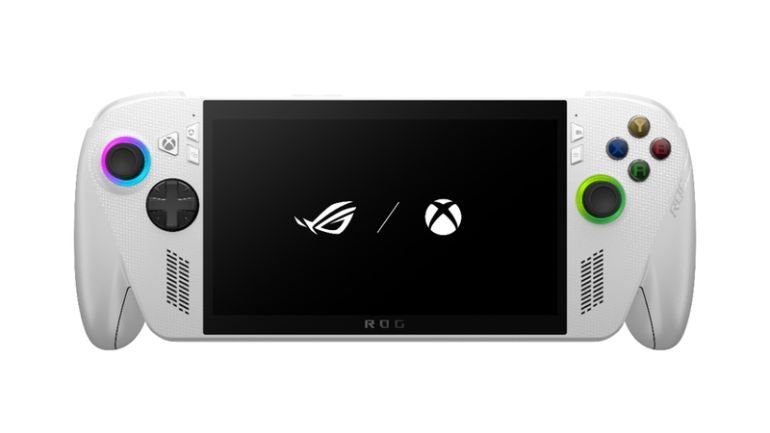
Handheld gaming gets better every year, and the ROG Xbox Ally is one of the most exciting launches yet. Made by ASUS ROG with Xbox, this handheld gaming console gives you a simple console-style screen along with the full freedom of Windows 11. In this review, we look at its design, screen, speed, battery, and games to see if it is worth your money.
Key features of the ROG Xbox Ally
| Feature | Details |
| Processor | AMD Ryzen™ Z2 A Processor |
| Graphics | AMD Radeon Graphics |
| Memory | 16GB LPDDR5 |
| Storage | 512GB NVMe SSD |
| Display | 7-inch Full HD, 120Hz, 500 nits |
| Battery | 60Wh |
| Operating System | Windows 11 Home |
| Weight | 670g |
| Connectivity | Wi-Fi 6E, Bluetooth 5.4 |
| Ports | 2x USB-C, microSD slot, 3.5mm audio jack |
Xbox-style design and comfortable grips
The ROG Xbox Ally feels like an Xbox controller with a screen in the middle. Here is what stands out:
- Curved, textured grips that sit well in your hands
- Familiar ABXY buttons and stick layout
- Two back buttons that you can set up yourself
- A weight of 670g that feels balanced
This matters because long gaming sessions can tire your hands. Here, the grip keeps things comfortable, even after a few hours of play.
7-Inch 120Hz full HD display
The screen is where this handheld gaming console really shines. It is a 7-inch Full HD touchscreen, so games look sharp and bright. The 120Hz refresh rate makes fast action feel smooth, and FreeSync Premium helps stop screen tearing.
- 500 nits of brightness, which works well even outdoors
- Gorilla Glass protection against scratches
- 10-point touch for easy menu use
Whether you play at home or outside, the display keeps up.
AMD Ryzen Z2 a processor and performance
Inside, the ROG Xbox Ally runs on the AMD Ryzen Z2 A chip, with 16GB of RAM and a 512GB SSD. ASUS says it is up to 20% faster than the older ROG Ally in its own tests.
- Handles many popular PC and Xbox games well
- Works best at lower settings for the smoothest play
- Has a microSD slot if you need more space
It will not match a gaming laptop, but for a handheld, it is a solid step up.
60Wh battery and power modes
Battery life matters a lot on a handheld and the 60Wh battery is built to last. You also get three power modes, so you can choose what suits you:
- Silent mode: quieter play and longer battery life
- Performance mode: a good balance of speed and battery
- Turbo mode: the smoothest gameplay, but it uses power faster
A 65W charger comes in the box, so topping up is easy. Playing for hours away from a wall socket is possible.
Xbox full screen experience
When you turn on the ROG Xbox Ally, it opens straight into a full-screen Xbox-style home. This makes the device feel like a real console instead of a small PC. It is easy to use with just sticks and buttons.
- The Xbox button opens the Game Bar for quick settings
- You can chat with friends and capture your gameplay
- A task switcher lets you jump to Windows desktop mode
You get the ease of use of a console with the power of Windows right behind it.
Play games from Steam, Epic, Game Pass and the Cloud
Because it runs Windows 11, this handheld works with many game stores. You are not stuck with just one.
- Install games from Steam, Epic, GOG, and Xbox
- Get 3 months of Game Pass Premium with your purchase
- Stream games through the cloud or play from your Xbox console with Remote Play
Some users say switching between stores can feel slow at first. Still, having all your games in one place is a big plus.
Final Verdict
The ROG Xbox Ally is a great pick if you want a comfortable, easy-to-use handheld gaming console that plays almost everything. It offers a bright screen, good grips and a flexible game library. A few software bumps may show up, but updates should help. If you want more power, look at the Ally X instead.
Be the first to comment on "ROG Xbox Ally Review: Console-Level Gaming Power in Your Pocket"