
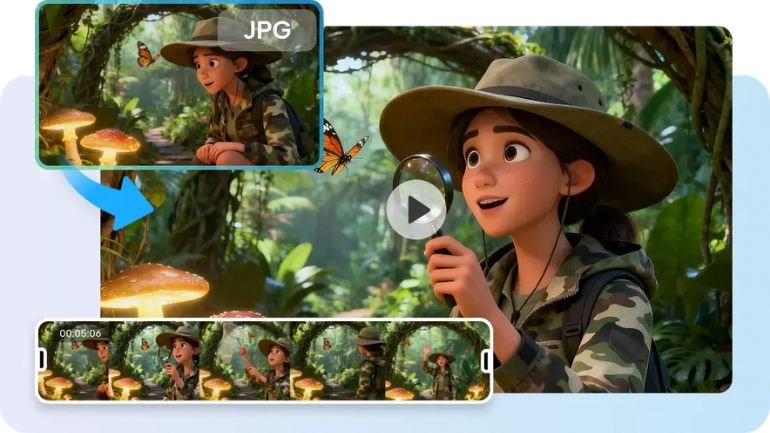
Longer AI videos produce more powerful stories, as the visual movement and continuity are uninterrupted. Creators need to have interconnected scenes, maintaining characters, actions, and settings. Pippit is a tool that can be used to extend the footage generated, without having to build a complete video. This workflow caters to the generation, refinement, editing, and exporting of a creative process all in one.
Understanding Seamless Footage Extension in AI Video Creation
Footage extension involves adding more footage after a video sequence without changing the direction of the footage. It is a process that ensures consistency in AI video production, such as characters, products, places, and camera styles. With Pippit’s advanced generation techniques, creators can seamlessly continue scenes. An AI video generator can take small ideas and create longer video sequences and fix the consistency. One of the issues with extending footage is that the various clips will need to be matched up, which can be more work. For ads, stories, demonstrations, tutorials, and social media, continuous flow is important. Emotional pacing and visual connection are maintained with extended generation. Product videos can be produced to show other use cases. Natural actions can be carried on in lifestyle scenes. Story Projects can grow without abrupt jumps in the pictures.

Planning Videos That Can Be Extended Naturally
Better results are achieved when videos require further footage later, if planning is done. Each extension has a clear beginning, middle, and end to provide a logical direction. Seedance 2.5 accommodates arranged continuation, making sure important scene details are lined up. Begin by establishing the primary topic, setting, activity, and ultimate purpose. Maintain consistency in the appearance of the subject through clothing, color, shape, and positioning. Use camera direction by explaining movement patterns and framing. Logical scene progression helps the viewers to comprehend all the added moments. Prompts should not be cut short but should be open-ended for future actions. Explain potential next shots, changes in the environment, and camera moves. This will provide Pippit with more creative information for longer sequences. If you plan the details, there will be fewer unwanted changes during footage expansion.
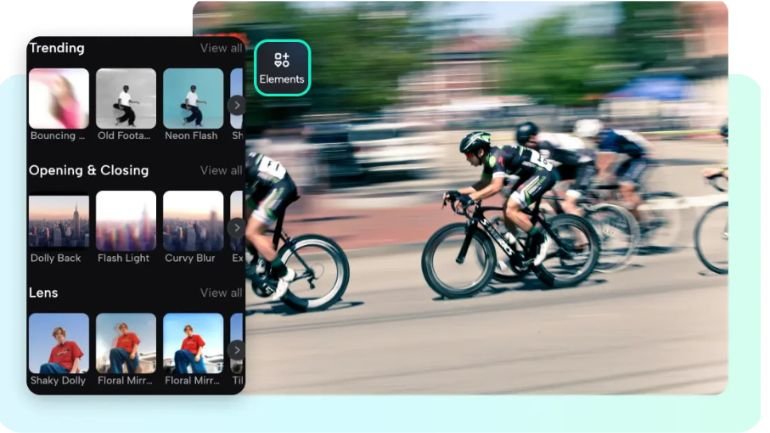
Steps to Extend Footage Seamlessly Within One Video with Seedance 2.5
Step 1: Prepare your video extension setup
-
Sign up for Pippit using a Google, TikTok, or Facebook account.
-
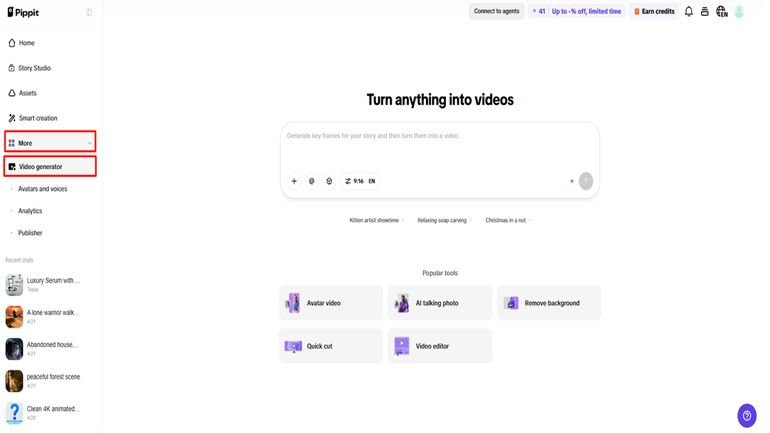
Open the “More” tab from the left vertical menu bar and access “Video generator”.
-
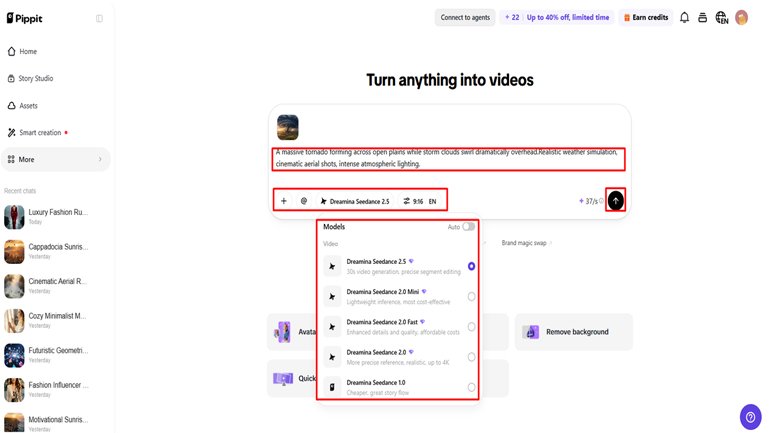
Select an AI model like “Dreamina Seedance 2.5” to extend your footage naturally.
-
Enter a detailed text prompt describing how you want the next video section to continue.
-
Select the video length, language, subtitles, and aspect ratio if needed.
-
Click “+” to upload reference images or videos from your device, phone, Dropbox, or a link. You can also choose assets if you do not have reference media.
-
Click “Generate” after adding all details.
Step 2: Generate extended footage
-
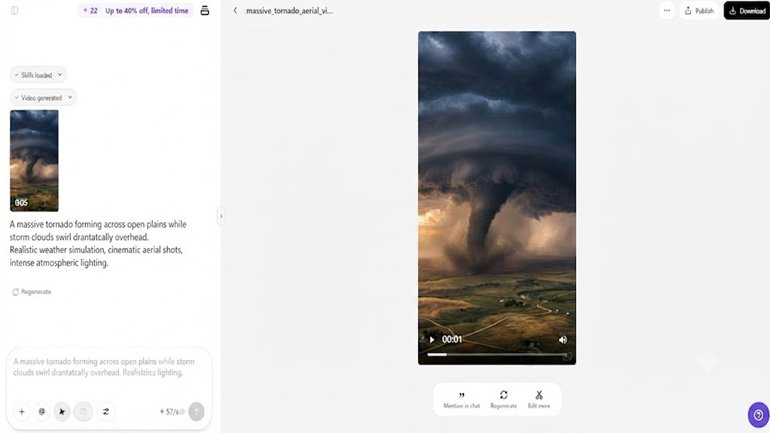
After clicking “Generate”, Pippit’s AI video generator creates a smooth continuation based on your prompt and reference media.
-
The AI handles editing elements like transitions, pacing, captions, avatars, voice, lyrics, and visual enhancements.
-
You will receive a video draft to review.
Step 3: Edit and export the final video
-
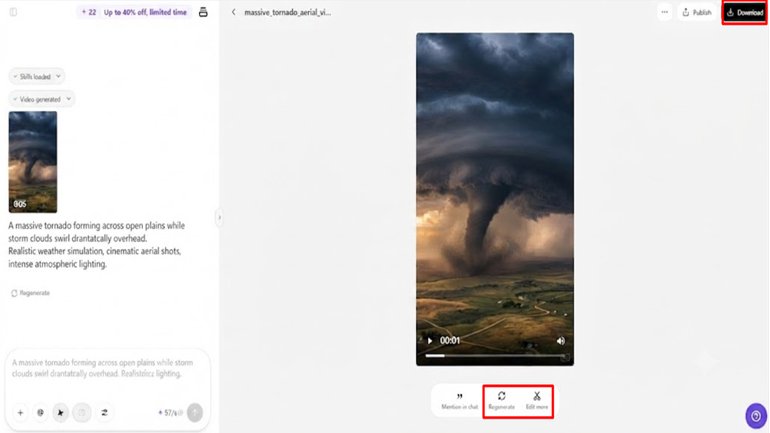
Click the “Download” tab in the top right corner to save the video directly. You can click “Regenerate” for another result or select the “Edit more” tab below the video for further customization.
-
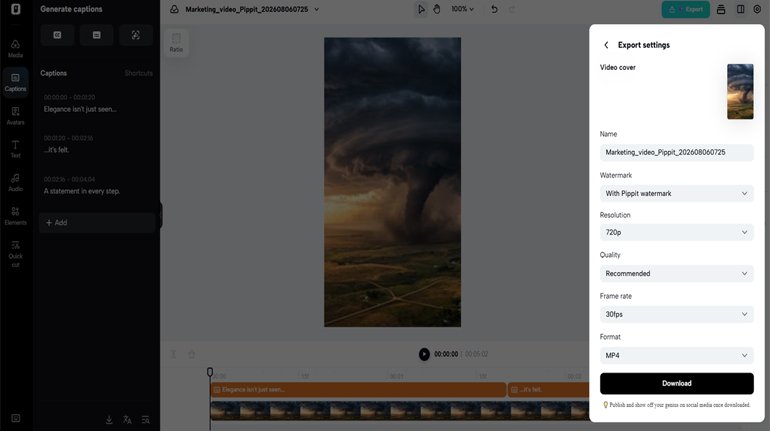
Edit captions manually, add text, and adjust size, color, alignment, filters, and effects.
-
Add background music, remove backgrounds, and refine visuals to improve the final result.
-
Click “Export” in the top right corner when finished.
-
Select “Publish” to share on TikTok, Instagram, or Facebook, or choose “Download” to save the video with your preferred format, resolution, frame rate, and quality.
Building Longer Video Sequences Without Losing Continuity
Longer videos are best suited for content that has each additional piece contributing to the original intent. Close-ups can be extended to complete use scenarios. Lifestyle videos may be a succession of 1 action to a related everyday moment. Story sequences may be used to add new events without interrupting the visual identity. Using camera perspective helps the audience see that scenes are related. The same angles, speed of movement, and framing result in smoother transitions. Pippit allows creators to edit longer footage carefully. Objects and subjects move naturally thanks to the logic that is used in cinema. More meaningful information in each extension makes longer sequences more interesting. Don’t have too many scenes that don’t serve the plot. Every extra moment should enhance the entire viewing experience.
Essential Practices for Better Footage Extensions
-
Subject Consistency: Make sure appearance, clothing, and positioning remain consistent in each long shot.
-
Keep Camera Motion: Maintain more consistent camera motion direction and framing for smoother visual continuity.
-
Maintain Consistency of Lighting: Maintain intensity and lighting atmosphere in the new footage created.
-
Add Relevant References: Add similar images with similar styles and compositions.
-
Extend Purposefully: Use purposeful actions; don’t use unhelpful scenes to interrupt pacing.
-
Review Every Draft: Check transitions and timing in the scenes before exporting them.
Features That Support High-Quality Extended Videos in Pippit
Pippit offers features for controlled and realistic extended video creation. Can produce 30-second videos in one take. This provides creators with extra space for product reveals, connected actions, and brief tales. There are two rounds of footage extension for continuing scenes. Images, videos, and visual assets can help to guide results with multi-modal reference support. Cinematic motion logic enhances the motion of the cameras and the relationship of scenes. Natural actions and physical interactions using realistic object movement. Green screen refinement for background replacement after the generation. These features are great for campaigns, social videos, product visuals, and creative storytelling projects. They also serve to ensure quality if the videos need several moments in a row.
Improving Extended Videos with Prompt Refinement
Immediate refinement enhances control of all longer sequences. Include scene-specific subject descriptions to preserve identity between scenes. Talk about what they look like, what materials they are made from, colors, and what is significant about them. Explain where things are, the lighting, atmosphere, background, and other environmental details. Use camera directions (close, far, move, move, etc.) with clear instructions. Ensure that all movement is physically believable, using natural movements and object behaviour. Balance creativity and precision – do not use unclear instructions. Pippit responds better to prompts that directly tell him what he should do. Detailed prompts for smoother extensions with added storytelling value. By examining each result, one can also see which aspects need further immediate adjustments.
Conclusion
Seedance 2.5 extension workflows enable creators to create longer videos without compromising on the flow of the story. Pippit combines generation, editing, reference, and export in one single process. The transitions between scenes are smooth and well designed, with subtle hints and cues. The longer an AI video is, the more beneficial it is, provided that every additional minute is in line with the initial concept.
Be the first to comment on "Extend Footage Seamlessly Within One Video Using Seedance 2.5"